An AI stylist app is only useful when it knows what you own.
Test the wardrobe input, the styling brief, and the complete outfit before trusting a recommendation.
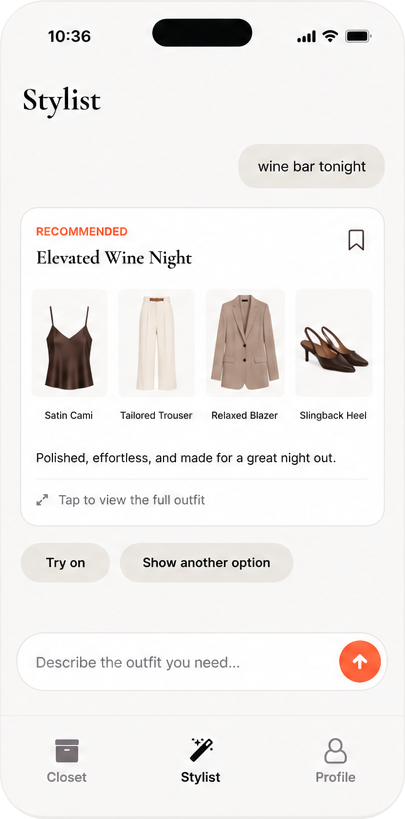
An AI stylist can show you an appealing look and still leave you with the same closet problem. If you want help getting dressed from your own clothes, test three links in the chain: the app needs to see your garments, understand the situation, and return a look you can evaluate.
Test the wardrobe input
Add photos of individual garments or import a closet. Then check whether you can correct a wrong color, category, or item. You should know which pieces went into the recommendation.
Give the stylist a real brief
The same black trousers can suit a meeting, a gallery opening, or a travel day. Name the venue, weather, dress code, and one comfort constraint. “Make me look good” gives the app too little to solve.
Check the complete look
A useful answer connects the pieces and settles the shoes, layer, and overall shape. If you still have to assemble the outfit yourself, you received a mood board rather than a styling decision.
Prompts worth trying
- “Use my linen pants for a hot-weather dinner. I want covered shoulders.”
- “Build a first-date outfit from my closet. Keep it polished but not formal.”
- “Use this denim jacket and avoid sneakers. I will be outside after sunset.”
Compare the answer with the brief. A modest suggestion that follows your constraints is more useful than a confident answer that ignores them.
How Outfitr handles the loop
Outfitr starts with photos of what you own, takes the occasion as part of the question, and returns a stylist recommendation. You can see the outfit on you in a photo, save it, or ask friends through a poll when two looks are close.
Read the closet-first app checklist, browse The Edit, or see the complete Outfitr workflow.
★ Available now
Ask from the clothes you own.
Give your stylist the closet, the occasion, and the constraint.
Download Outfitr →